Short answer
Pick 3 to 5 competitors per client. Find the pages where each one states prices and offers. Save a dated screenshot of each as a baseline. Re-check on a fixed schedule, log every real change with before and after proof, and report it with one line on what it means.
Step 1: Pick the competitors that matter
Start with the client, not a search engine. Ask who they lost a job to recently and who customers compare them with. Then search the client's main service plus their city and note who shows up in the results and on the map.
Keep it to 3 to 5 direct competitors per client. More than that and nobody reads the updates. Our guide on how to choose which competitors to track for a client covers this step in detail.
Step 2: Find where the prices actually live
Most service businesses do not publish a neat price list. Their prices hide in a few places:
- A pricing or rates page. The obvious one, when it exists.
- A specials or offers page. Seasonal deals, coupons and limited-time discounts.
- The services page. "From $X" prices, package names and free extras.
- Financing pages and homepage banners. Payment plans and headline promotions.
Watch those, not the whole site. Blog posts and job listings change often and almost never say anything about price.
Step 3: Know what counts as a price change
A price change is anything that changes what a lead pays or gets for the money. That includes:
- A new list price, up or down.
- A tier or package added, removed or renamed.
- A fee added or dropped, such as a call-out or consultation fee.
- A discount or promotion, especially one with an end date.
- A free extra added or taken away, like a free inspection.
- New financing terms.
- A published price replaced with "call for a quote", or the reverse.
The last one is easy to miss and often the most telling. A competitor that starts publishing prices is going after buyers who want to self-qualify.
Step 4: Set a baseline
Before you can spot a change, you need a record of today. For every page you watch, save a full-page screenshot, the URL and the date. Then note the current price points in a simple log with these columns: client, competitor, page, price or offer, date seen, screenshot link.
This takes an hour per client the first time. It is the step most agencies skip, and the reason they cannot prove a change later.
Step 5: Check on a fixed schedule
Pick a rhythm that fits how you report, and stick to it. Promotions often run for a few weeks, so checking twice a week catches them while they still matter. Checking once a month means you report offers that already ended.
When you compare a page with your baseline, ignore the noise: changing dates, rotating banners, cookie notices and review widgets. Only log changes a lead would notice.
Step 6: Log each change with proof
Each real change gets one entry: the date you found it, a before and after screenshot, the type of change and one sentence on what moved. For example:
Replaced a free inspection with 20% off full roof replacements until Nov 30.
The sentence matters more than the screenshot. "Pricing page changed" is not useful. "Free inspection replaced with 20% off until Nov 30" is.
Step 7: Turn the change into advice
A logged price change is only half the job. Before you send it, answer three questions for your client:
- Promotion or new price? A deal with an end date needs a short, timed answer. A new list price may be a lasting repositioning.
- Which of the client's offers does it hit? Name the service or package that now looks expensive by comparison.
- What is the cheapest sensible response? Often it is sharper messaging about value, not a matching discount. Sometimes it is nothing.
Then put it in the client report. Our template for the competitor section of a monthly client report shows how to lay it out.
When doing it by hand stops working
Do the math for your roster. 10 clients with 4 competitors each and 2 pages per competitor is 80 pages. At a minute per page, one round of checks takes well over an hour, before screenshots and notes. Twice a week, that is close to three hours of checking, every week. The real cost is the checks that get skipped in a busy week.
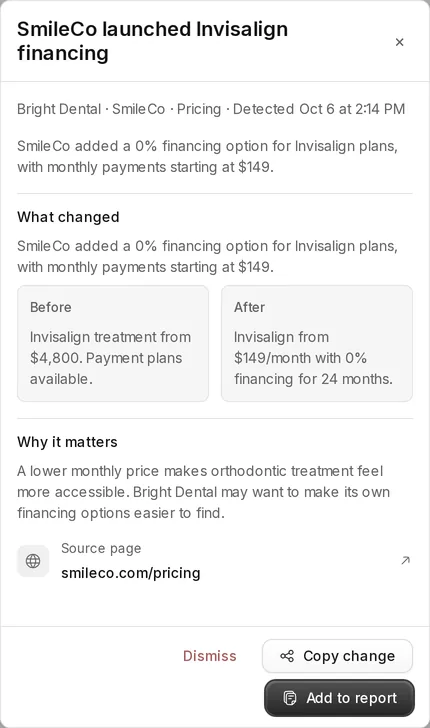
Tonic automates steps 2 to 6. It finds each competitor's pricing and offer pages, tracks up to 3 key pages per competitor, checks every Monday and Thursday, ignores noise like dates and ads, and saves before and after proof with a plain-words explanation, ranked by importance and filed under the right client.
Read more about competitor price monitoring for agencies, or compare Tonic plans, billed yearly.